Tool comparison
Wedding Seating Plan: Spreadsheet vs Online Tool (And When to Use Each)
Last updated: March 9, 2026
When couples first start organising their wedding seating plan, a spreadsheet is usually the first place they turn.
It makes sense - spreadsheets are familiar, easy to set up, and great for organising a guest list. At the beginning of the planning process, they can be incredibly helpful.
But as the seating plan begins to take shape, many couples notice that spreadsheets start to feel a little harder to work with. Moving guests between tables, visualising the layout of the room, and keeping track of changes can quickly become more complicated than expected.
The good news is that you don't need to choose one or the other. In fact, many couples find the easiest approach is using both tools together.
When a Spreadsheet Works Best
Spreadsheets are excellent for the early stages of wedding planning.
When you're still building your guest list, they make it easy to organise information like:
- Guest names
- Couples and families
- RSVP responses
- Dietary requirements
- Notes about guests
Seeing everything listed in one place makes it simple to manage your guest list as it grows and changes.
For many couples, this becomes the foundation of their seating plan.
Where Spreadsheets Start Getting Difficult
The challenge usually appears when it's time to start assigning guests to tables.
In a spreadsheet, you might add a column for table numbers and begin moving guests around. But once tables start filling up, it becomes harder to picture how the room actually looks.
You may find yourself scrolling up and down the list trying to remember who is sitting where, or moving rows around again and again as tables change.
This is where many couples realise that while spreadsheets are great for organising names, they aren't designed to show a room layout.
Where an Online Seating Planner Helps
Online seating planners approach the problem differently.
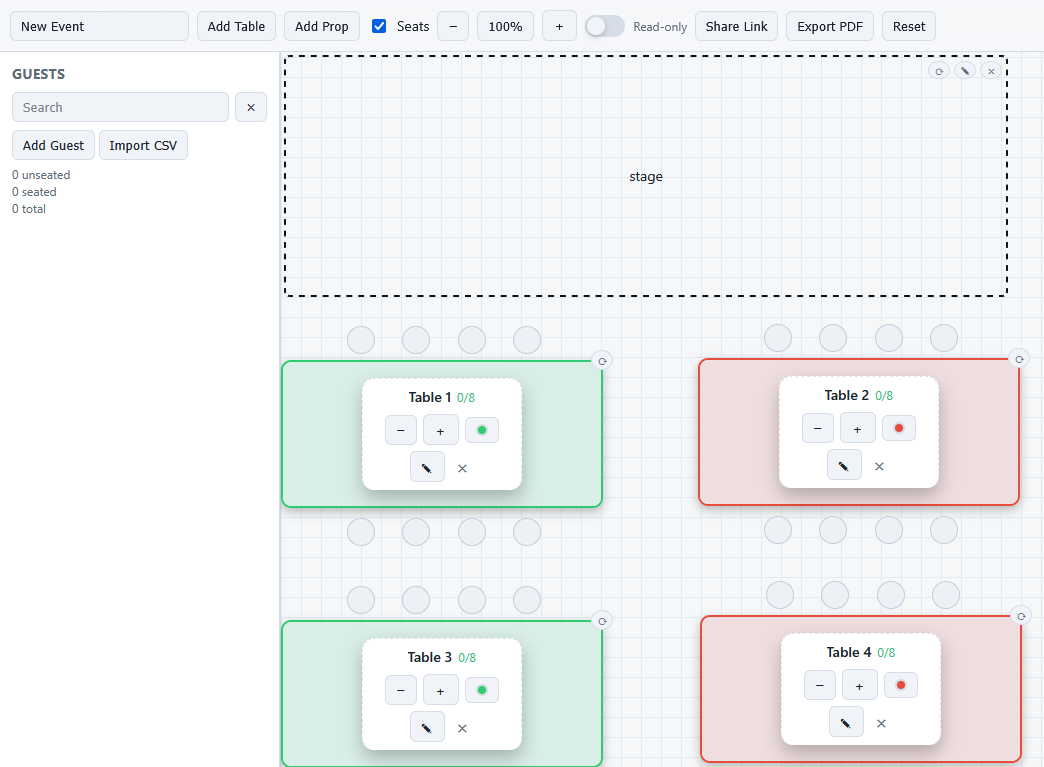
Instead of a list of names, you see the tables laid out visually, just like they will appear in the reception room.
Guests can be moved between tables easily, and the overall layout becomes much easier to understand at a glance.
This makes it simpler to answer questions like:
- Are tables evenly filled?
- Are close friends sitting together?
- Are family members seated nearby?
When you can see the whole room, adjustments tend to feel much more natural.
A Simple Workflow That Works Well
Many couples use a combination of both tools.
First, they organise their guest list in a spreadsheet. This helps them keep track of RSVPs, dietary notes, and guest groups.
Then, once the guest list is mostly confirmed, they move into a visual seating planner where they can arrange tables and experiment with the layout.
This approach keeps the organisation of a spreadsheet while gaining the flexibility of a visual plan.
The Goal Isn't Perfection
One reassuring thing to remember is that most seating plans change several times before the wedding day.
Guests update their RSVPs, table sizes may shift, and small adjustments are completely normal.
Having tools that make those changes easier simply removes some of the stress from the process.
Making the Seating Plan Easier to Adjust
If you'd like to experiment with a visual layout after organising your guest list, you can try arranging your tables using MySeatPlanner.
Many couples find it helpful for moving guests between tables and seeing how the full room layout comes together.